
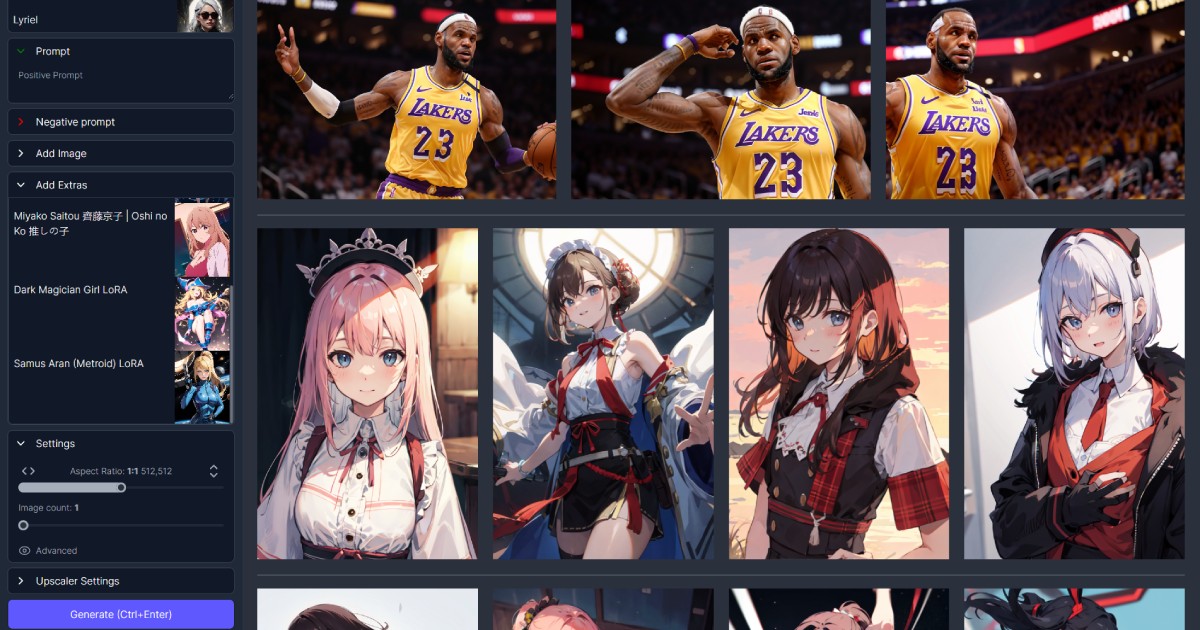
Makeayo transforms text prompts into artwork and applies style transfers to existing images through a platform designed for accessibility rather than technical complexity. Whether you’re a hobbyist or a professional, you can use its generative art tools without needing deep AI expertise — it’s designed for accessibility.
Free Windows App for Local Stable Diffusion Generation
Makeayo provides a suite of tools for generative art. Users can generate images from text descriptions (text-to-image) or modify existing visuals (image-to-image). The platform supports HD upscaling, boosting image resolution up to 4K. Features like pose matching allow for precise control over character compositions by replicating poses from input images. It’s also got inpainting for selective image editing, ControlNets for fine-tuned generation, and a LoRa selection for specific artistic styles. An integrated model browser and an extensive model library further enhance creative possibilities.
Windows Users, AI Art Beginners, and Privacy-Conscious Creators
This tool serves a diverse user base. Photographers and designers can use it for creative exploration or quick mock-ups. Digital artists and hobbyists can generate unique pieces or experiment with new styles. Professional creatives in game design, film, and animation will find it’s useful for concept art or asset creation. Businesses can use Makeayo for marketing materials, merchandise designs, or social media content. AI enthusiasts and students can also explore advanced generative AI techniques without deep technical knowledge.
Drag-and-Drop Interface, No Command Line Required
Makeayo utilizes top-tier AI models, including full SDXL support, ControlNets, Loras, and Flux foundational models, ensuring high-quality and detailed outputs. Initially a desktop application for Windows 10 and 11, it expanded in December 2024 to include a web-based cloud platform. This cloud version offers universal access from any device, such as Mac, Chromebook, iPad, or smartphone, so you don’t need to install anything. The desktop version’s still getting updates and allows users to use their own powerful graphics cards (Nvidia and AMD GPUs) for local processing. Makeayo was developed in partnership with RunDiffusion, enabling cloud environment operations through such integrations.
Free Download, GPU Required for Acceptable Speed
Makeayo operates on a freemium model, offering a free version alongside paid plans that unlock additional benefits:
| Plan | Price | Key Details |
|---|---|---|
| Free | Free | Basic access, limited credits |
| Founder | $12/month | 2,000 monthly credits, HD downloads, priority rendering, uncapped generation steps, full HD upscaling, beta access |
| Pro | $35/month | 20,000 monthly credits, HD downloads, priority rendering, uncapped generation steps, full HD upscaling, beta access |
Paid plans offer higher credit allocations, priority rendering queues, and full HD upscaling, catering to users with more intensive creative needs.
Windows Only, Limited Advanced Controls vs ComfyUI
While Makeayo aims for user-friendliness, mastering all its features might require an initial learning period. The desktop application, though powerful, demands a capable graphics card, which can be a problem if you’re not packing a powerful GPU. Although the cloud version addresses the initial Windows-only limitation, users should consider privacy concerns, as with any platform handling creative data. One reported instance highlighted an upscaling inconsistency where a low-strength HD upscale transformed a T-Rex into a Rottweiler, indicating that so you’re not always getting what you expect. Additionally, while the tool initially promised "unlimited" generation, the introduction of credit limits in paid tiers may be a point of contention for users seeking truly unrestricted local generation.