

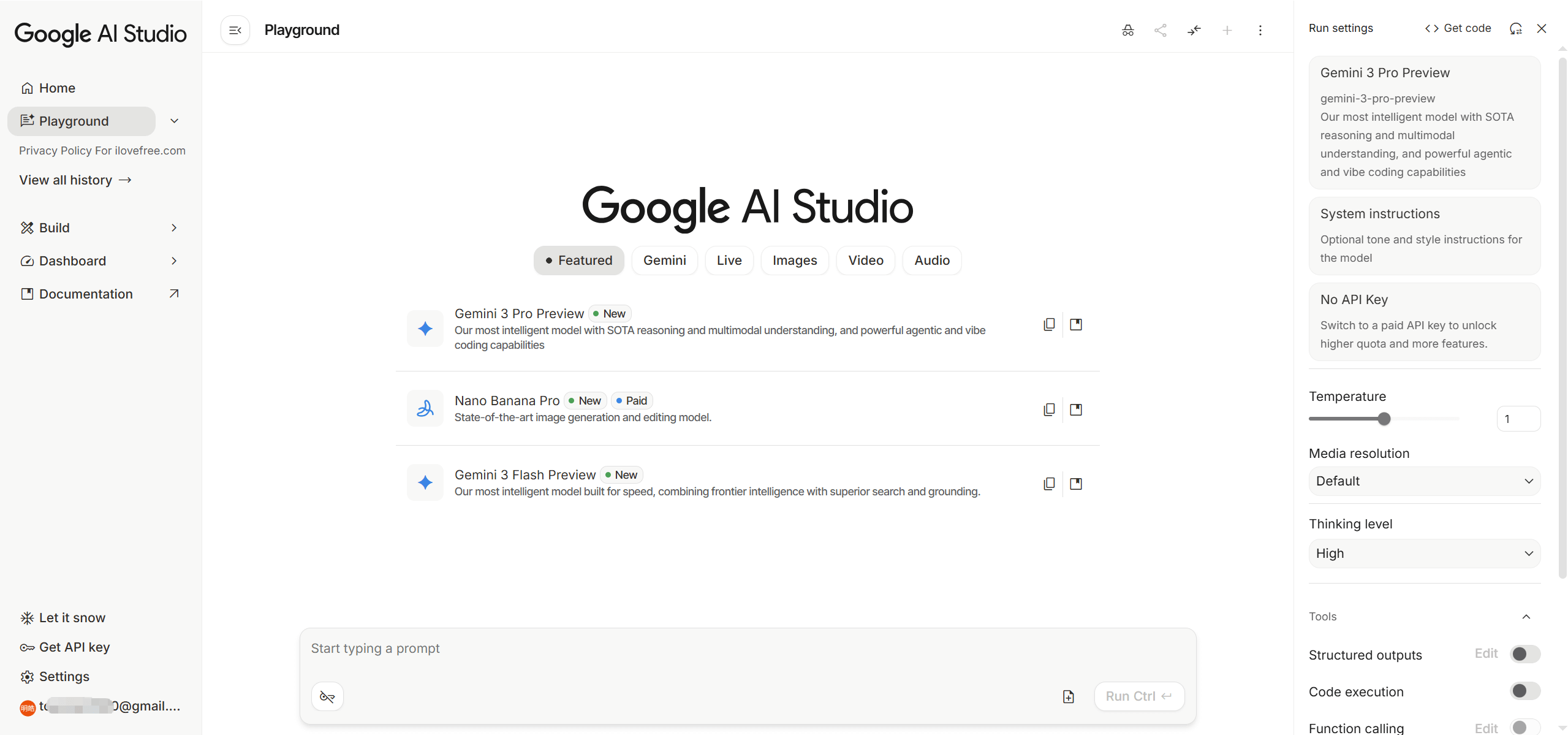
Google AI Studio offers a browser-based integrated development environment (IDE) for building and experimenting with generative AI applications. It’s a platform where developers and creators can use Google’s AI models, primarily the Gemini family, to prototype a wide range of AI solutions.
Browser-Based IDE for Gemini, Imagen, Veo, and More
This web-based tool allows users to test models, refine prompts, and generate various forms of content. It supports multimodal AI generation, meaning you can create text, images, video, and audio. Additionally, it facilitates app prototyping and code export, making it a well-rounded environment for early-stage AI development.
Chatbot Builders, Content Teams, and Startups
AI Studio supports developers, data scientists, and business analysts:
- Building chatbots: Creating customer support chatbots or interactive AI agents.
- Content generation: Producing marketing campaign content, product descriptions, or creative writing.
- Ideation and research: Aiding in product ideation, market research, and automating business workflows.
Startups, indie developers, e-commerce companies, and marketing agencies find value in its capabilities.
1-Million-Token Context, 20+ File Formats, and Native Android Output
Google AI Studio provides access to a diverse set of Google’s AI models and supports extensive data handling:
- Supported Models: Access the Gemini family (including Gemini 3 Pro, Flash, Flash-Lite, 2.5 Pro, 2.5 Flash), Imagen for images, Veo for video, Lyria for music, Nano Banana for image editing, LearnLM, and Gemma.
- Input Formats: It handles a wide array of file types, including text (TXT, PDF, DOCX, CSV), spreadsheets (CSV, TSV), images (PNG, JPEG, WebP), audio (AAC, FLAC, MP3, WAV, WEBM), and video (MP4, MOV, WebM).
- Context Window: Gemini models can process large context windows, supporting up to 1 million tokens, which is beneficial for analyzing extensive documents.
- Integrations: The platform integrates with Google Workspace (Sheets, Drive, Docs), GitHub, Google Cloud, Firebase (for Firestore and Authentication in web apps), and Zapier.
20 GB Storage, 10 Files per Prompt, and Tiered Rate Limits
AI Studio has specific limits that users should plan around:
- Project Storage: A total project storage limit of 20 GB.
- Files per Prompt: Up to 10 files can be uploaded per prompt in Gemini Apps.
- Rate Limits: Requests Per Minute (RPM), Tokens Per Minute (TPM), Requests Per Day (RPD), and Images Per Minute (IPM) are applied per project. These vary by model and usage tier. Preview models, like Gemini 3 Pro in Tier 1, can have restrictive limits, such as 250 RPD.
Free for Prototyping, Pay-as-You-Go for Production API
Google AI Studio itself is free for prototyping and development. There’s no subscription or payment required for basic usage. However, costs arise when deploying applications to production via the Gemini API. This operates on a pay-as-you-go model, with pricing determined by token usage and the specific model chosen (e.g., Gemini 3.1 Pro, Flash, Flash-Lite). Google AI Pro and Ultra subscriptions offer increased usage limits and access to specific models within AI Studio.
Rapid Prototyping and Google Ecosystem Integration
AI Studio excels in several areas, particularly for those within the Google ecosystem:
- Rapid Prototyping: It offers a streamlined experience for experimenting with Google’s Gemini models without needing complex local setups.
- Large Context Windows: Its ability to handle up to 1 million tokens makes it effective for analyzing extensive documents, surpassing some alternatives.
- Multimodal Generation: Strong built-in capabilities for generating images, video, and audio content.
- Native Android App Output: Unique support for generating Android apps using Kotlin and Jetpack Compose, including an in-browser emulator.
- Ecosystem Integration: Deep integration with Google Workspace, Cloud, Maps, and Search Grounding provides a cohesive workflow.
- PDF Processing: Efficiently processes visually complex PDFs, extracting data and recognizing layouts.
Privacy Risks on Free Tier, Platform Inconsistency, and No Third-Party Models
Despite its strengths, Google AI Studio has areas that users should be aware of. The platform is described as "messy in places, inconsistent in others, and still clearly evolving." The free version can be slow for larger tasks. A significant privacy concern for free-tier users is that Google may use submitted prompts, uploaded files, and generated responses to improve its products, with human reviewers potentially accessing this data. Users are advised against submitting sensitive information on the free tier. Additionally, rate limits, especially for preview models, can be restrictive, with 250 requests per day sometimes proving insufficient for real-world development. The platform doesn’t support third-party models like GPT-5 or Claude, and Firebase integration for Firestore and Authentication is currently limited to web applications, not Android apps.